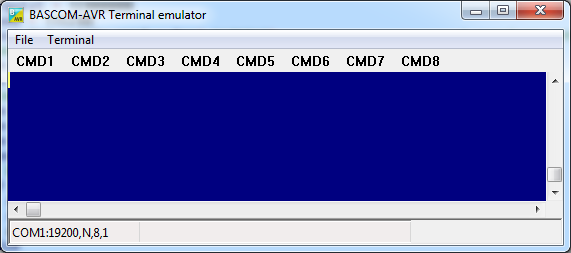
With this option you can communicate via the RS-232 interface to the microcomputer. The following window will appear:

Information you type and information that the computer board sends are displayed in the same window.
Note that you must use the same baud rate on both sides of the transmission. If you compiled your program with the Compiler Settings at 4800 baud, you must also set the Communication Settings to 4800 baud.
The setting for the baud rate is also reported in the report file.
 NOTE: The focus MUST be on this window in order to see any data (text, etc) sent from the processor. You will NOT see any data sent by the processor right after a reset. You must use an external hardware reset AFTER the terminal Emulator window is given focus in order to see the data. Using the Reset
  shortcut, you will not be able to see any data because pressing the shortcut causes the Terminal emulator to lose focus. This is different than “Hyper Terminal” which always receives data even when the Hyper terminal window does not have focus. Use Hyper terminal if you need to see the program output immediately after programming or reset. Or use the option 'Keep terminal emulator open' from the Options, Communication.
File Upload
Uploads the current program from the processor chip in HEX format. This option is meant for loading the program into a monitor program for example. It will send the current compiled program HEX file to the serial port.
File Escape
Aborts the upload to the monitor program.
File Exit
Closes terminal emulator.
Terminal Clear
Clears the terminal window.
Terminal Open Log
Opens or closes the LOG file. When there is no LOG file selected you will be asked to enter a filename or to select a filename. All info that is printed to the terminal window is captured into the log file. The menu caption will change into 'Close Log' and when you choose this option the file will be closed.
Terminal Send ASCII
This option allows you to send any ASCII character you need to send. Values from 000 to 255 may be entered.

Terminal Send Magic number
This option will send 4 bytes to the terminal emulator. The intention is to use it together with the boot loader examples. Some of the boot loader samples check for a number of characters when the chip resets. When they receive 4 'magic' characters after each other, they will start the boot load procedure. This menu options send these 4 magic characters.
Terminal Setting
This options will show the terminal settings so you can change them quickly.
It is the same as Options, Communication.
Terminal User Commands
This option will show or hide the toolbar with the user definable command buttons.
There are 16 user definable buttons named CMD1-CMD16. When you hover the mouse cursor above the button, the button data will be shown.
When you right click the mouse above the button, you can enter the data for the button.
Example for CMD4:

In the sample above the data "test" will be sent. No carriage return(CR) or line feed(LF) will be sent. If you want to send them as well you need to include them as special characters.
Special characters are entered with their 3 digit ASCII value between brackets : {xxx}
For example to send CR + LF you wend enter {013}{010}
See Also